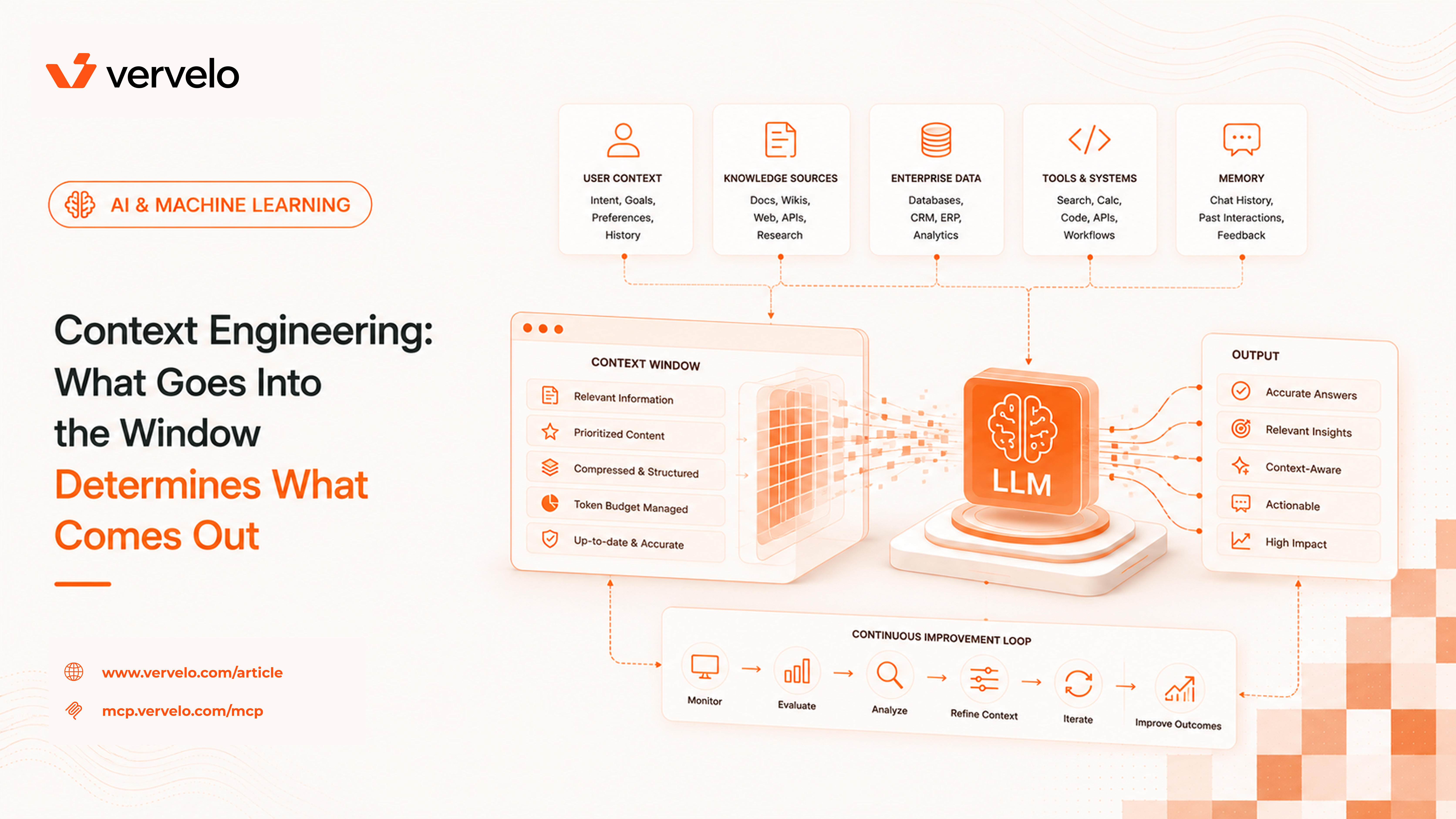
Context engineering is the discipline that emerged after teams realized prompt phrasing matters less than what you put in the context window. A well-crafted prompt with poor context produces poor outputs. The inverse is often not true. You can write a clunky, unpretty prompt and still get excellent results if the model has exactly the information it needs to answer well. This is the insight that separates teams shipping reliable AI products from teams debugging mysterious regressions.
The Context Window as a Workspace
The context window is the finite working memory an LLM has access to during inference. Everything the model “knows” about your request — its instructions, the conversation so far, any documents you’ve retrieved, the user’s question — must fit within this space. The model has no other memory during a given call.
Current practical limits vary by model. GPT-4o supports 128k tokens. Claude 3.5 and Claude 3 support 200k. Gemini 1.5 Pro extends to 1M tokens, which sounds like it eliminates the problem entirely.
It doesn’t.
Larger windows help, but they don’t solve retrieval quality. Models still struggle with what researchers call the “lost in the middle” problem — a finding from a 2023 paper by Liu et al. showing that LLMs perform significantly worse at retrieving relevant information placed in the middle of a long context compared to information at the beginning or end. If you stuff 500k tokens of documentation into the context and the answer sits in the middle of chunk 312, the model may miss it or give it less weight than context near the boundaries.
Beyond retrieval quality, cost and latency scale with context length. Input tokens are cheap but not free. At 200k tokens per request with 100 requests per minute, you’re processing 1.2 billion tokens per hour. That adds up. Latency also increases — time to first token generally correlates with context length across providers.
The point is that having a large context window is a capability, not a strategy. What you put in that window — and what you leave out — is the engineering decision.
The Anatomy of a Context Window
Every production LLM request involves multiple components competing for space in the context window. Understanding the breakdown helps you optimize each part independently.
1. System prompt — Instructions, persona, constraints, output format requirements. This is the “always on” portion that costs tokens on every single request. A bloated system prompt with outdated instructions, redundant examples, and formatting rules that only apply to 10% of requests is one of the most common sources of wasted tokens.
2. Conversation history — Prior turns in the conversation. In a multi-turn chat application, this grows with every exchange. Without management, a long conversation will eventually overflow the window or make every request expensive.
3. Retrieved documents — Content pulled from external sources via RAG. The chunk text, source metadata, and any formatting all consume tokens. Retrieval quality directly determines whether these tokens are useful signal or noise.
4. Tool results — Responses from function calls: database query results, API responses, code execution output. These can be large and are often verbose. A database query returning 50 rows of raw JSON is almost always more than the model needs.
5. The current user query — Usually the smallest part, but the thing everything else should be organized around.
Each component competes for the same space. Every decision about what to include and exclude — system prompt length, how many conversation turns to keep, how many RAG chunks to retrieve, how much to trim tool outputs — is a context engineering decision. Made thoughtfully, these decisions improve quality and reduce cost. Made carelessly, they’re the source of most mysterious LLM quality issues.
Retrieval-Augmented Generation (RAG)
RAG is the core pattern for including external knowledge in a context window without fine-tuning. The basic idea: instead of cramming an entire knowledge base into the prompt, retrieve only the relevant pieces at query time and inject those.
The retrieval pipeline has a few steps:
- Embed the query — Convert the user’s question into a vector using an embedding model (e.g.,
text-embedding-3-small from OpenAI, or embed-english-v3.0 from Cohere).
- Search a vector store — Query a database like Pinecone, Weaviate, pgvector, or Chroma for the nearest neighbors by cosine similarity.
- Retrieve top-k chunks — Fetch the top 5 to 20 chunks, depending on your window budget and the query type.
- Inject into the prompt — Format the retrieved chunks and insert them before the user’s query.
const queryEmbedding = await openai.embeddings.create({
  model: "text-embedding-3-small",
  input: userQuery,
});

const results = await vectorStore.query({
  vector: queryEmbedding.data[0].embedding,
  topK: 10,
  includeMetadata: true,
});

const context = results.matches
  .map((m) => `Source: ${m.metadata.source}\n${m.metadata.text}`)
  .join("\n\n---\n\n");

const prompt = `Use the following context to answer the question.\n\n${context}\n\nQuestion: ${userQuery}`;
Chunk size and overlap
Chunking strategy is often underrated. Too small (128 tokens), and individual chunks lack enough context to be useful — a sentence about “the dosage” is meaningless without the surrounding paragraph naming what drug. Too large (1024+ tokens), and you retrieve imprecise matches that waste space on irrelevant content.
A common starting point is 256–512 tokens with a 10–20% overlap between adjacent chunks. Overlap ensures that sentences split across chunk boundaries still get retrieved when either half matches the query.
Re-ranking
Embedding similarity retrieves semantically related content but doesn’t always retrieve the most factually relevant content. A cross-encoder re-ranker takes the query and each retrieved chunk as a pair and scores relevance more precisely. Models like Cohere’s rerank-english-v3.0 or a local cross-encoder from sentence-transformers can meaningfully improve precision at the cost of an extra API call.
The pattern: retrieve top-20 by embedding similarity, re-rank, keep top-5. You retrieve broadly and then filter precisely.
RAG vs. fine-tuning
RAG is the right choice when knowledge changes frequently, when the knowledge base is large, or when you need citations and traceability. Fine-tuning is better when you need the model to consistently produce a specific format or style, or when a narrow domain concept appears so frequently that it needs to be in the model’s weights rather than retrieved each time. The two are not mutually exclusive — a fine-tuned model with RAG is a reasonable architecture for specialized applications.
Context Compression
When you have more relevant information than fits your token budget, you need to compress. A few approaches:
Selective inclusion — The simplest approach. Rank retrieved chunks by relevance score and include only the top N. Set a token budget for the retrieval section and stop adding chunks once you hit it. No summarization overhead.
Summarization — Use an LLM to summarize each retrieved document before including it. A 2,000-token document might compress to a 200-token summary. The tradeoff is accuracy: summarization loses detail, and you pay for the summarization call.
def summarize_chunk(chunk: str, query: str, client) -> str:
    response = client.messages.create(
        model="claude-3-haiku-20240307",
        max_tokens=200,
        messages=[{
            "role": "user",
            "content": f"Summarize this document in 2-3 sentences, focusing on information relevant to: {query}\n\nDocument:\n{chunk}"
        }]
    )
    return response.content[0].text
Map-reduce — For cases where you need to synthesize across many documents. Summarize each document independently (the “map” step), then combine the summaries into a final synthesis (the “reduce” step). This works well for tasks like “summarize these 20 support tickets related to billing” where you can process each ticket separately.
Recursive summarization for conversation history — When conversation history grows long, compress older turns. Keep the last 5 turns verbatim, summarize the previous 20 turns into a paragraph, and discard anything older. This preserves recent context fidelity while keeping a high-level record of earlier discussion.
The principle across all of these: compression always loses information. Measure the impact on your eval suite before deploying. What feels like a reasonable summary to a human may drop the exact detail the model needs.
Conversation Memory Strategies
Long-running conversations need explicit memory management. Three patterns cover most cases:
Sliding window — Keep the last N turns (e.g., last 10 exchanges). Simple, predictable, cheap. The downside: the model forgets everything before the window. For most customer support or Q&A applications, this is fine.
const MAX_TURNS = 10;
const recentHistory = conversationHistory.slice(-MAX_TURNS * 2); // *2 for user+assistant pairs
Summarized history — Maintain a rolling summary of older turns. When the conversation grows past a threshold, summarize the oldest N turns and prepend that summary to the retained history.
[Summary]: User is troubleshooting a Node.js memory leak in their Express app.
They've ruled out event listener accumulation. Previous analysis pointed to
a caching layer using unbounded Map objects.

[Turn 8]: User: "I checked the cache — it's using an LRU but max size is
set to Infinity"
[Turn 9]: Assistant: ...
Entity memory — Extract and maintain a structured record of key entities mentioned in the conversation. For a customer support bot, this might be the account ID, product version, and open ticket numbers. For a coding assistant, the files and functions being discussed. Entity memory can be injected compactly at the start of the system prompt.
{
  "user_context": {
    "account_id": "acct_8823",
    "plan": "enterprise",
    "open_tickets": ["TKT-4421", "TKT-4502"],
    "product_version": "3.2.1"
  }
}
These patterns can be combined. A production system might use entity memory (always injected), summarized history (for sessions over 15 minutes), and a sliding window of recent turns.
Context Caching
Anthropic and Google both offer prompt caching: if you send the same prefix repeatedly across requests, the cached KV (key-value) attention state is reused rather than recomputed. This cuts costs and latency on the cached portion.
Anthropic’s cache pricing reduces cost for the cached portion by approximately 90% on cache hits (you pay for cache writes and a small read fee). Google’s Gemini 1.5 offers similar economics on its context caching API.
The practical use case: a large system prompt or reference document that doesn’t change between requests. A 50,000-token legal document used as a reference for document review. A 30,000-token API specification used by a coding assistant. If you’re sending the same large content on every request, caching is the highest-ROI optimization available.
# Anthropic cache_control example
response = client.messages.create(
    model="claude-3-5-sonnet-20241022",
    max_tokens=1024,
    system=[
        {
            "type": "text",
            "text": large_reference_document,
            "cache_control": {"type": "ephemeral"}
        },
        {
            "type": "text",
            "text": "Answer questions based on the document above."
        }
    ],
    messages=[{"role": "user", "content": user_query}]
)
The cached prefix must be identical across requests — same text, same position, same model. Any change to the cached portion invalidates the cache. Structure your prompts so that static content comes first and dynamic content (the user query, retrieved chunks) comes last.
Routing and Context Selection
Different queries need different context. A question about a patient’s medication history needs retrieved records from a clinical database. A question about billing needs invoice data. A general question about how the product works needs documentation. Sending all of this context on every request is wasteful and introduces noise.
Context routing is the pattern of classifying the query first, then applying the appropriate retrieval strategy.
type QueryType = "clinical" | "billing" | "product_docs" | "general";

async function routeAndRetrieve(query: string): Promise<string> {
  const queryType = await classifyQuery(query); // lightweight classifier call

  switch (queryType) {
    case "clinical":
      return await retrieveFromClinicalDB(query);
    case "billing":
      return await retrieveFromBillingSystem(query);
    case "product_docs":
      return await retrieveFromDocumentation(query);
    default:
      return ""; // no retrieval needed
  }
}
The classifier can be a fast, small model (GPT-4o-mini or Claude Haiku), a simple keyword heuristic, or a fine-tuned classification model. The goal is to avoid retrieving irrelevant context, not to be clever about classification.
This pattern also lets you optimize each retrieval path independently. Clinical data retrieval might need strict access controls and smaller chunks. Documentation retrieval might benefit from semantic search with re-ranking. You can tune each path without affecting the others.
What to Do Next
Start with an audit of your current system prompt. Open it and ask: is every instruction in here actually needed for every request? Most system prompts accumulate instructions over time — rules added for edge cases, examples added during debugging, constraints added after incidents. Many of them can be removed, shortened, or moved into routing logic.
Next, profile your token usage per request. Log the token counts by component: system prompt, conversation history, retrieved context, tool results, user query. This takes an hour to instrument and immediately shows you where the tokens are going. In most systems, two or three components account for 80% of the token spend.
From there, implement caching on your system prompt. If your system prompt is over 10,000 tokens and doesn’t change between requests, you can cut costs substantially with one API parameter change. This is the lowest-effort, highest-impact optimization available.
If RAG is part of your system, check your chunk size and whether you have a re-ranker in the pipeline. Retrieval precision problems are common and often misdiagnosed as model capability issues. Before concluding that the model isn’t smart enough to answer correctly, verify that the right information is actually in the context.
Finally, build an eval suite if you don’t have one. Context engineering changes are hard to reason about in the abstract. A set of representative queries with expected outputs tells you whether a context change improved or degraded quality. Without evals, you’re optimizing blind.
The context window is a workspace. What you put in it is your call.